Sunday, July 1, 2012

Get All Database with respective sizes from your Server


with fs
as
(
    select database_id, type, size * 8.0 / 1024 size
    from sys.master_files
)
select
    name,
    (select sum(size) from fs where type = 0 and fs.database_id = db.database_id) DataFileSizeMB,
    (select sum(size) from fs where type = 1 and fs.database_id = db.database_id) LogFileSizeMB
from sys.databases db

OR

EXEC sp_MSforeachtable @command1="EXEC sp_spaceused '?'"

Thursday, June 28, 2012

SQL Server BACKUP LOG command

Overview
There are only two commands for backup, the primary is BACKUP DATABASE which backs up the entire database and BACKUP LOG which backs up the transaction log.  The following will show different options for doing transaction log backups.

Explanation
 The BACKUP LOG command gives you many options for creating transaction log backups.  Following are different examples.

Create a simple transaction log backup to disk
The command is BACKUP LOG databaseName.  The "TO DISK" option specifies that the backup should be written to disk and the location and filename to create the backup is specified.  The file extension is "TRN".  This helps me know it is a transaction log backup, but it could be any extension you like.  Also, the database has to be in the FULL or Bulk-Logged recovery model and at least one Full backup has to have occurred.
BACKUP LOG AdventureWorks 
TO DISK = 'C:\AdventureWorks.TRN'
GO

Create a log backup with a password
This command creates a log backup with a password that will need to be supplied when restoring the database.
BACKUP LOG AdventureWorks 
TO DISK = 'C:\AdventureWorks.TRN'
WITH PASSWORD = 'Q!W@E#R$'
GO

Create a log backup with progress stats
This command creates a log backup and also displays the progress of the backup.  The default is to show progress after every 10%.
BACKUP LOG AdventureWorks 
TO DISK = 'C:\AdventureWorks.TRN'
WITH STATS
GO

Here is another option showing stats after every 1%.
BACKUP LOG AdventureWorks 
TO DISK = 'C:\AdventureWorks.TRN'
WITH STATS = 1
GO

Create a backup and give it a description
This command uses the description option to give the backup a name.  This can later be used with some of the restore commands to see what is contained with the backup.  The maximum size is 255 characters.
BACKUP LOG AdventureWorks 
TO DISK = 'C:\AdventureWorks.TRN'
WITH DESCRIPTION = 'Log backup for AdventureWorks'
GO

Create a mirrored backup
This option allows you to create multiple copies of the backups, preferably to different locations.
BACKUP LOG AdventureWorks 
TO DISK = 'C:\AdventureWorks.TRN'
MIRROR TO DISK =  'D:\AdventureWorks_mirror.TRN'
WITH FORMAT
GO

Specifying multiple options
 This example shows how you can use multiple options at the same time.
BACKUP LOG AdventureWorks 
TO DISK = 'C:\AdventureWorks.TRN'
MIRROR TO DISK =  'D:\AdventureWorks_mirror.TRN'
WITH FORMAT, STATS, PASSWORD = 'Q!W@E#R$'
GO

SQL Server BACKUP DATABASE command

OverviewThere are only two commands for backup, the primary is BACKUP DATABASE.  This allows you to do a complete backup of your database as well as differential, file, etc. backups depending on the options that you use.

ExplanationThe BACKUP DATABASE command gives you many options for creating backups.  Following are different examples.

Create a full backup to diskThe command is BACKUP DATABASE databaseName.  The "TO DISK" option specifies that the backup should be written to disk and the location and filename to create the backup is specified.
BACKUP DATABASE AdventureWorks 
TO DISK = 'C:\AdventureWorks.BAK'
GO

Create a differential backup
This command adds the "WITH DIFFERENTIAL" option.
BACKUP DATABASE AdventureWorks 
TO DISK = 'C:\AdventureWorks.BAK' 
WITH DIFFERENTIAL 
GO

Create a file level backup
This command uses the "WITH FILE" option to specify a file backup.  You need to specify the logical filename within the database which can be obtained by using the command sp_helpdb 'databaseName', specifying the name of your database.
BACKUP DATABASE TestBackup FILE = 'TestBackup' 
TO DISK = 'C:\TestBackup_TestBackup.FIL'
GO

Create a filegroup backup
This command uses the "WITH FILEGROUP" option to specify a filegroup backup.  You need to specify the filegroup name from the database which can be obtained by using the command sp_helpdb 'databaseName', specifying the name of your database.
BACKUP DATABASE TestBackup FILEGROUP = 'ReadOnly' 
TO DISK = 'C:\TestBackup_ReadOnly.FLG'
GO

Create a full backup to multiple disk files
This command uses the "DISK" option multiple times to write the backup to three equally sized smaller files instead of one large file.
BACKUP DATABASE AdventureWorks 
TO DISK = 'C:\AdventureWorks_1.BAK',
DISK = 'D:\AdventureWorks_2.BAK',
DISK = 'E:\AdventureWorks_3.BAK'
GO

Create a full backup with a password
This command creates a backup with a password that will need to be supplied when restoring the database.
BACKUP DATABASE AdventureWorks 
TO DISK = 'C:\AdventureWorks.BAK'
WITH PASSWORD = 'Q!W@E#R$'
GO

Create a full backup with progress stats
This command creates a full backup and also displays the progress of the backup.  The default is to show progress after every 10%.
BACKUP DATABASE AdventureWorks 
TO DISK = 'C:\AdventureWorks.BAK'
WITH STATS
GO

Here is another option showing stats after every 1%.
BACKUP DATABASE AdventureWorks 
TO DISK = 'C:\AdventureWorks.BAK'
WITH STATS = 1
GO

Create a backup and give it a description
This command uses the description option to give the backup a name.  This can later be used with some of the restore commands to see what is contained with the backup.  The maximum size is 255 characters.
BACKUP DATABASE AdventureWorks 
TO DISK = 'C:\AdventureWorks.BAK'
WITH DESCRIPTION = 'Full backup for AdventureWorks'
GO

Create a mirrored backup
This option allows you to create multiple copies of the backups, preferably to different locations.
BACKUP DATABASE AdventureWorks 
TO DISK = 'C:\AdventureWorks.BAK'
MIRROR TO DISK =  'D:\AdventureWorks_mirror.BAK'
WITH FORMAT
GO

Specifying multiple options
This next example shows how you can use multiple options at the same time.
BACKUP DATABASE AdventureWorks 
TO DISK = 'C:\AdventureWorks.BAK'
MIRROR TO DISK =  'D:\AdventureWorks_mirror.BAK'
WITH FORMAT, STATS, PASSWORD = 'Q!W@E#R$'
GO

Shortcut to Show and Hide SSMS Results Pane

Problem

When using SSMS the query window is usually made up of the Editor on the top half and after you execute code Results are displayed on the bottom half. The problem with this is that if you need to modify the code in the Editor section the display is limited because the results pane takes up the bottom half of the window. You could resize the results section, but in this tip we look at a simple shortcut to show and hide the results pane.

Solution

The simple solution is to use the Ctrl+R shortcut to toggle between showing and hiding the results pane.
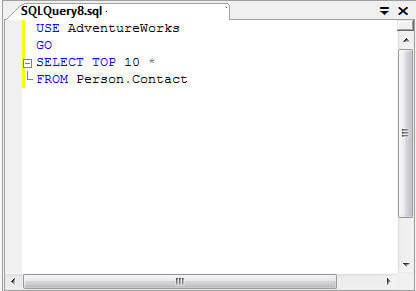
Here is a sample query window in SSMS with just the Editor section.
a sample query window in ssms
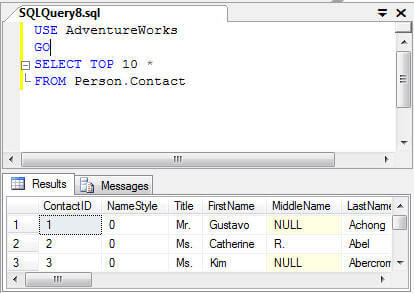
After we execute the code, half of the screen is now taken up by the Results pane.
toggle between showing and hiding the results pane when using ssms
If we just use Ctrl+R we can toggle between showing and hiding the results pane and therefore you can see more of the Editor section when you are using SQL Server Management Studio.

Thursday, June 7, 2012

Page Life Cycle

Here I have listed how the event is fire in page life cycle

OnInit Event Fire On a Page Life Cycle

i) Master Page User Control-init
ii) Page User COntrol-init
iii)Master Page -init
iv) Page - init


Page Load Event Fire On A Page life Cycle.

i) Page -Load
ii) Master Page-Load
iii)Page User Control - Load
iv) Master page User COntrol - Load


Data Binding Event Fire On A Page Life Cycle

i) Page - DataBinding
ii) Master Page - DataBinding
iii)Page User Control - Data Binding
iv) Master Page User COntrol - DataBinding

Unload Event Fire On A Page life Cycle

i) Master Page User Control-Unload
ii) Page User Control-Unload
iii)Master Page -Unload
iv) Page - Unload


A pictorial Presentation Of page life Cycle


Tuesday, June 5, 2012

Difference between Abstract Class and Interface:

Most of the people confuses with Abstract class and interface. Here I am planning to share some information with examples, I hope this will help you more………

Simple abstract class looks like this:
public abstract class KarateFight{
public void bowOpponent(){
//implementation for bowing which is common for every participant       }
public void takeStand(){
//implementation which is common for every participant
}
public abstract boolean fight(Opponent op);
//this is abstract because it differs from person to person
}

The basic interface looks like this:
public interface KarateFight{
public boolean fight(Opponent op);
public Integer timeOfFight(String person);
}

The differences between abstract class an interface as fallows:
1.  Abstract class has the constructor, but interface doesn’t.
2.  Abstract classes can have implementations for some of its members (Methods), but the interface can’t have implementation for any of its members.
3.  Abstract classes should have subclasses else that will be useless..
4. Interfaces must have implementations by other classes else that will be useless
5. Only an interface can extend another interface, but any class can extend an abstract class..
6.  All variable in interfaces are final by default
7. Interfaces provide a form of multiple inheritance. A class can extend only one other class.
8. Interfaces are limited to public methods and constants with no implementation. Abstract classes can have a partial implementation, protected parts, static methods, etc.
9.  A Class may implement several interfaces. But in case of abstract class, a class may extend only one abstract class.
10. Interfaces are slow as it requires extra indirection to to find corresponding method in in the actual class. Abstract classes are fast.
11. Accessibility modifier(Public/Private/internal) is allowed for abstract class. Interface doesn’t allow accessibility modifier
12.  An abstract class may contain complete or incomplete methods. Interfaces can contain only the signature of a method but no body. Thus an abstract class can implement methods but an interface can not implement methods.
13.  An abstract class can contain fields, constructors, or destructors and implement properties. An interface can not contain fields, constructors, or destructors and it has only the property’s signature but no implementation.
14. Various access modifiers such as abstract, protected, internal, public, virtual, etc. are useful in abstract Classes but not in interfaces.
15.  Abstract scope is upto derived class.
16.  Interface scope is upto any level of its inheritance chain.

Java Abstract Class and Interface Interview Questions

What is the difference between Abstract class and Interface
Or
When should you use an abstract class, when an interface, when both?
Or
What is similarities/difference between an Abstract class and Interface?
Or
What is the difference between interface and an abstract class?

1. Abstract class is a class which contain one or more abstract methods, which has to be implemented by sub classes. An abstract class can contain no abstract methods also i.e. abstract class may contain concrete methods. A Java Interface can contain only method declarations and public static final constants and doesn't contain their implementation. The classes which implement the Interface must provide the method definition for all the methods present.
2. Abstract class definition begins with the keyword "abstract" keyword followed by Class definition. An Interface definition begins with the keyword "interface".
3. Abstract classes are useful in a situation when some general methods should be implemented and specialization behavior should be implemented by subclasses. Interfaces are useful in a situation when all its properties need to be implemented by subclasses
4. All variables in an Interface are by default - public static final while an abstract class can have instance variables.
5. An interface is also used in situations when a class needs to extend an other class apart from the abstract class. In such situations its not possible to have multiple inheritance of classes. An interface on the other hand can be used when it is required to implement one or more interfaces. Abstract class does not support Multiple Inheritance whereas an Interface supports multiple Inheritance.
6. An Interface can only have public members whereas an abstract class can contain private as well as protected members.
7. A class implementing an interface must implement all of the methods defined in the interface, while a class extending an abstract class need not implement any of the methods defined in the abstract class.
8. The problem with an interface is, if you want to add a new feature (method) in its contract, then you MUST implement those method in all of the classes which implement that interface. However, in the case of an abstract class, the method can be simply implemented in the abstract class and the same can be called by its subclass
9. Interfaces are slow as it requires extra indirection to to find corresponding method in in the actual class. Abstract classes are fast
10.Interfaces are often used to describe the peripheral abilities of a class, and not its central identity, E.g. an Automobile class might
implement the Recyclable interface, which could apply to many otherwise totally unrelated objects.
Note: There is no difference between a fully abstract class (all methods declared as abstract and all fields are public static final) and an interface.
Note: If the various objects are all of-a-kind, and share a common state and behavior, then tend towards a common base class. If all they
share is a set of method signatures, then tend towards an interface.
Similarities:
Neither Abstract classes nor Interface can be instantiated.

What does it mean that a method or class is abstract?
An abstract class cannot be instantiated. Only its subclasses can be instantiated. A class that has one or more abstract methods must be declared abstract. A subclass that does not provide an implementation for its inherited abstract methods must also be declared abstract. You indicate that a class is abstract with the abstract keyword like this:
    public abstract class AbstractClass
Abstract classes may contain abstract methods. A method declared abstract is not actually implemented in the class. It exists only to be overridden in subclasses. Abstract methods may only be included in abstract classes. However, an abstract class is not required to have any abstract methods, though most of them do. Each subclass of an abstract class must override the abstract methods of its superclasses
or itself be declared abstract. Only the method’s prototype is provided in the class definition. Also, a final method can not be abstract and vice versa. Methods specified in an interface are implicitly abstract.
. It has no body. For example,
public abstract float getInfo()

What must a class do to implement an interface?
The class must provide all of the methods in the interface and identify the interface in its implements clause.

What is an abstract method?
An abstract method is a method whose implementation is deferred to a subclass.

What is interface? How to support multiple inhertance in Java?
Or
What is a cloneable interface and how many methods does it contain?
An Interface are implicitly abstract and public. Interfaces with empty bodies are called marker interfaces having certain property or behavior. Examples:java.lang.Cloneable,java.io.Serializable,java.util.EventListener. An interface body can contain constant declarations, method prototype declarations, nested class declarations, and nested interface declarations.
Interfaces provide support for multiple inheritance in Java. A class that implements the interfaces is bound to implement all the methods defined in Interface.
Example of Interface:
public interface sampleInterface {
public void functionOne();
public long CONSTANT_ONE = 1000;
}

What is an abstract class?
Or
Can you make an instance of an abstract class?
Abstract classes can contain abstract and concrete methods. Abstract classes cannot be instantiated directly i.e. we cannot call the constructor of an abstract class directly nor we can create an instance of an abstract class by using “Class.forName().newInstance()” (Here we get java.lang.InstantiationException). However, if we create an instance of a class that extends an Abstract class, compiler will initialize both the classes. Here compiler will implicitly call the constructor of the Abstract class. Any class that contain an abstract method must be declared “abstract” and abstract methods can have definitions only in child classes. By overriding and customizing the abstract methods in more than one subclass makes “Polymorphism” and through Inheritance we define body to the abstract methods. Basically an abstract class serves as a template. Abstract class must be extended/subclassed for it to be implemented. A class may be declared abstract even if it has no abstract methods. This prevents it from being instantiated. Abstract class is a class that provides some general functionality but leaves specific implementation to its inheriting classes.
Example of Abstract class:
abstract class AbstractClassExample{
protected String name;
public String getname() {
return name;
}
public abstract void function();
}
Example: Vehicle is an abstract class and Bus Truck, car etc are specific implementations
No! You cannot make an instance of an abstract class. An abstract class has to be sub-classed.
If you have an abstract class and you want to use a method which has been implemented, you may
need to subclass that abstract class, instantiate your subclass and then call that method.

What is meant by "Abstract Interface"?
Firstly, an interface is abstract. That means you cannot have any implementation in an interface.
All the methods declared in an interface are abstract methods or signatures of the methods.

How to define an Interface?
In Java Interface defines the methods but does not implement them. Interface can include constants.
A class that implements the interfaces is bound to implement all the methods defined in Interface.
Example of Interface:
public interface SampleInterface {
public void functionOne();
public long CONSTANT_ONE = 1000;
}

Can Abstract Class have constructors? Can interfaces have constructors?
Abstract class's can have a constructor, but you cannot access it through the object, since you cannot instantiate abstract class. To access the constructor create a sub class and extend the abstract class which is having the constructor.
Example
public abstract class AbstractExample {
public AbstractExample(){
System.out.println("In AbstractExample()");
}
}
public class Test extends AbstractExample{
public static void main(String args[]){
Test obj=new Test();
}
}

If interface & abstract class have same methods and those methods contain no implementation, which one would you prefer?
Obviously one should ideally go for an interface, as we can only extend one class. Implementing an interface for a class is very much effective rather than extending an abstract class because we can extend some other useful class for this subclass