Thursday, October 10, 2013

Implementing HTTPHandler and HTTPModule in ASP.NET

ASP.NET handles all the HTTP requests coming from the user and generates the appropriate response for it. ASP.NET framework knows how to process different kind of requests based on extension, for example, It can handle request for .aspx, .ascx and .txt files, etc. When it receives any request, it checks the extension to see if it can handle that request and performs some predefined steps to serve that request.

Now as a developer, we might want to have some of our own functionality plugged in. We might want to handle some new kind of requests or perhaps we want to handle an existing request ourselves to have more control on the generated response, for example, we may want to decide how the request for .jpg or .gif files will be handled. Here, we will need an HTTPHandler to have our functionality in place.

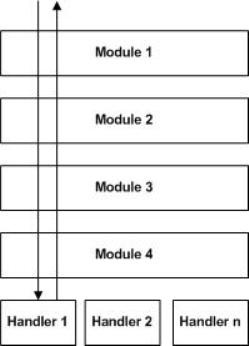
There are also some scenarios where we are ok with the way ASP.NET is handling the requests but we want to perform some additional tasks on each request, i.e., we want to have our tasks execute along with the predefined steps ASP.NET is taking on each request. If we want to do this, we can have HTTPModule in place to achieve that.

So from the above discussion, it is clear that HTTPHandlers are used by ASP.NET to handle the specific requests based on extensions. HTTPModule, on the other hand, is used if we want to have our own functionality working along with the default ASP.NET functionality. There is one Handler for a specific request but there could be N number of modules for that.

Note: The HTTPHandler example here is just for demonstration purpose, I am not recommending the use of HTTPHandlers for something that I am about to do now. HTTPHandlers should ideally be used to customize the handling of existing MIME types and not for serving search engine friendly URLs or non standard URLs.


You can get detailed information of code Download here

For More details you can check this link, i got the idea from this side only

Monday, October 7, 2013

Find Google Plus,Twitter and Face book Count using c#

I have an requirement that need to display social network share count displayed over my landing page for that i have implemented the code developed in asp.net with c#, you can find the detailed information on below link, here is demo of my source code that contains only source file.

I have implemented this for Facebook, Twitter, Linkedin, Youtube and Google Plus


    protected void Page_Load(object sender, EventArgs e)
    {
        linkedinSiteURl = "http://www.linkedin.com/cws/followcompany?companyIdentifier=164878&counterPosition=right";
        youtubeSiteURl = "http://gdata.youtube.com/feeds/api/users/maxlife";

        //LikesCount = "123456789"; // 12,34,56,789
        //LikesCount.FinalNumber();       

        #region Facebook Working
        GetFBCount(fbSiteURl);
        fbCount.Text = string.Format("{0} Likes", LikesCount.FinalNumber());
        #endregion

        #region youtube Working
        GetYoutubeCount(youtubeSiteURl);
        youTubeCount.Text = string.Format("{0} Views", LikesCount.FinalNumber());
        #endregion

        #region Linked in
        GetLinkedinCount(linkedinSiteURl);
        linkedInCount.Text = string.Format("{0} Followers", LikesCount.FinalNumber());
        #endregion

        #region twitter
        GetTweeterCount(TwSiteURl);
        twtCount.Text = string.Format("{0} Followers", LikesCount.FinalNumber());
        #endregion

        #region g Plus
        GetgplusCount(gplusSiteURl);
        gPlusCount.Text = string.Format("{0} Followers", LikesCount.FinalNumber());       
        #endregion
    }


for more detail code please downlaod this link


Thursday, October 3, 2013

How to fix "Validation(): Element 'xxxx' is not supported" Visual Studio 2010, Intelsense is not Coming in Visual Studio

Hi Friends i have found the issue after moving the source files from one mac to another mac visual studio Intel sense is not come i find lots of site there re-install the visual studio then its work,

So Before re-installing first try to these steps

The idea is to remove the folder "ReflectedSchemas" from paths:

Win XP : C:\Documents and Settings\{username}\Application Data\Microsoft\VisualStudio\10.0\ReflectedSchemas

Win Vista / 7: C:\Users\{username}\AppData\Roaming \Microsoft\VisualStudio\10.0\ReflectedSchemas

Note: make sure that "Show hidden files, folders, and drives" is selected from Folder Options,also don't forget to close VS before deleting the folder.

This solution should work for VS2010 and VS2008,at VS2008 you have to delete ReflectedSchemas from folder 9.0 not 10.0.

I got this Idea from wonder full blog for more details Click Here

Wednesday, October 2, 2013

Get My (Current) IP and Hosted file IP

To Retrieve My machine IP Address using in c# you just need to write a single line i.e.

Request.UserHostAddress

And you  will receive your IP


================================================================

To Get Hosted file IP Address you need to add this much code on your site

using System.Net;
using System.Net.NetworkInformation;

protected void Page_Load(object sender, EventArgs e)
    {
Response.Write("My Ip Address : 1) " + GetIpAddress() + "      2) " + Request.UserHostAddress + "<br/>");
        Response.Write("My Hosted Address Ip : 1) " + GetHostedIP());
    }

 public string GetMyIpAddress()
    {
        string stringIpAddress;
        stringIpAddress = Request.ServerVariables["HTTP_X_FORWARDED_FOR"];
        if (stringIpAddress == null)
        {
            stringIpAddress = Request.ServerVariables["REMOTE_ADDR"];
        }
        return stringIpAddress;
    }

private string GetHostedIP()
    {
        string strHostName = "";
        strHostName = System.Net.Dns.GetHostName();
        IPHostEntry ipEntry = System.Net.Dns.GetHostEntry(strHostName);
        IPAddress[] addr = ipEntry.AddressList;
        return addr[addr.Length - 1].ToString();
    }

Thursday, September 26, 2013

Restrict max length textarea using jQuery and Javascript

 Draw Textarea control with class name comment
<asp:TextBox ID="txtComment" runat="server" Text="" TextMode="MultiLine" CssClass="comment" MaxLength="1000" />

Container to display number of chars are remaining
<div class="form_content" id="DivQueryLength"> 1000 characters left</div>

jQuery method to validate and show the messages

$(document).ready(function() {
        $(".comment").keyup(function() {
            validateLimit(this, 'DivQueryLength', 1000);
        });
        $(".comment").keydown(function() {
            validateLimit(this, 'DivQueryLength', 1000);
            //return checkMaxLen(event, this, 1000);
        });
 });

function validateLimit(obj, divID, maxchar) {
    objDiv = get_object(divID);
    if (this.id) obj = this;
    var remaningChar = maxchar - obj.value.length;
    if (objDiv) {
        objDiv.innerHTML = remaningChar + " characters left";
    }
    if (remaningChar <= 0) {
        obj.value = obj.value.substring(maxchar, 0);
        if (objDiv) {
            objDiv.innerHTML = "0 characters left";
        }
        return false;
    }
    else
    { return true; }
}

function get_object(id) {
    var object = null;
    if (document.layers) {
        object = document.layers[id];
    } else if (document.all) {
        object = document.all[id];
    } else if (document.getElementById) {
        object = document.getElementById(id);
    }
    return object;
}

Thursday, September 12, 2013

Wait Query in Sql or Dirty Read testing

A Dirty read takes no notice of any lock taken by another process. The read is officially “dirty” when it reads data that is uncommitted. This can become problematic if the uncommitted transaction fails or for some other reason is rolled back.
 
Imagine a scenario in which you are shopping on a website and place an item into your basket and proceed to payment. The site's checkout process decrements the stock by one and starts to charge your card all in the one transaction. At that time, a second unrelated process starts. The website's back office stock interface runs and makes a dirty read of all the product inventory levels, reading the reduced value. Unfortunately, there is a problem with your transaction (insufficient funds), and your purchase transaction is rolled back. The website stock level has now reverted to the original level, but the stock interface has just reported a different value.
 
Alter Proc Sp_Dirty
AS
Begin
    /*
    Create table Person(Id int Identity(1,1),FirstName varchar(50),LastName varchar(50))
    Insert into Person values('Murli  ','D');Insert into Person values('Deepak  ','D');Insert into Person values('Jamil  ','A')
    */   
    BEGIN TRANSACTION;   
    UPDATE Person     SET FirstName = 'Sujatha'    WHERE LastName = 'D';
    Select * from Person
    WAITFOR DELAY '00:00:05.000';
    ROLLBACK TRANSACTION;
    --Commit
    SELECT FirstName    ,LastName    FROM Person    WHERE LastName = 'D';
End

--=========For Calling =========

Select * from Person
Go
Exec Sp_Dirty

Monday, September 2, 2013

Global.asax file that read url, based on device and redirect to respective destination

        void Application_BeginRequest(object sender, EventArgs e)
        {
            #region 301 Code
            string domain = "http://murlid05.blogspot.com/";
            domain = Request.Url.AbsoluteUri.ToString().Trim().ToLower();
            if ((!domain.Contains("www")) && (!domain.Contains("localhost")))
            {
                domain = domain.Replace("://", "://www.");
                //Response.Status = "301 Moved Permanently";           
                //Response.AddHeader("Location", domain);
            }

            string TargetPage = string.Empty;
            string u = Request.ServerVariables["HTTP_USER_AGENT"];
            Regex b = new Regex(@"android.+mobile|avantgo|bada\/|blackberry|blazer|compal|elaine|fennec|hiptop|iemobile|ip(hone|od)|iris|kindle|lge |maemo|midp|mmp|netfront|opera m(ob|in)i|palm( os)?|phone|p(ixi|re)\/|plucker|pocket|psp|symbian|treo|up\.(browser|link)|vodafone|wap|windows (ce|phone)|xda|xiino", RegexOptions.IgnoreCase | RegexOptions.Multiline);
            Regex v = new Regex(@"1207|6310|6590|3gso|4thp|50[1-6]i|770s|802s|a wa|abac|ac(er|oo|s\-)|ai(ko|rn)|al(av|ca|co)|amoi|an(ex|ny|yw)|aptu|ar(ch|go)|as(te|us)|attw|au(di|\-m|r |s )|avan|be(ck|ll|nq)|bi(lb|rd)|bl(ac|az)|br(e|v)w|bumb|bw\-(n|u)|c55\/|capi|ccwa|cdm\-|cell|chtm|cldc|cmd\-|co(mp|nd)|craw|da(it|ll|ng)|dbte|dc\-s|devi|dica|dmob|do(c|p)o|ds(12|\-d)|el(49|ai)|em(l2|ul)|er(ic|k0)|esl8|ez([4-7]0|os|wa|ze)|fetc|fly(\-|_)|g1 u|g560|gene|gf\-5|g\-mo|go(\.w|od)|gr(ad|un)|haie|hcit|hd\-(m|p|t)|hei\-|hi(pt|ta)|hp( i|ip)|hs\-c|ht(c(\-| |_|a|g|p|s|t)|tp)|hu(aw|tc)|i\-(20|go|ma)|i230|iac( |\-|\/)|ibro|idea|ig01|ikom|im1k|inno|ipaq|iris|ja(t|v)a|jbro|jemu|jigs|kddi|keji|kgt( |\/)|klon|kpt |kwc\-|kyo(c|k)|le(no|xi)|lg( g|\/(k|l|u)|50|54|e\-|e\/|\-[a-w])|libw|lynx|m1\-w|m3ga|m50\/|ma(te|ui|xo)|mc(01|21|ca)|m\-cr|me(di|rc|ri)|mi(o8|oa|ts)|mmef|mo(01|02|bi|de|do|t(\-| |o|v)|zz)|mt(50|p1|v )|mwbp|mywa|n10[0-2]|n20[2-3]|n30(0|2)|n50(0|2|5)|n7(0(0|1)|10)|ne((c|m)\-|on|tf|wf|wg|wt)|nok(6|i)|nzph|o2im|op(ti|wv)|oran|owg1|p800|pan(a|d|t)|pdxg|pg(13|\-([1-8]|c))|phil|pire|pl(ay|uc)|pn\-2|po(ck|rt|se)|prox|psio|pt\-g|qa\-a|qc(07|12|21|32|60|\-[2-7]|i\-)|qtek|r380|r600|raks|rim9|ro(ve|zo)|s55\/|sa(ge|ma|mm|ms|ny|va)|sc(01|h\-|oo|p\-)|sdk\/|se(c(\-|0|1)|47|mc|nd|ri)|sgh\-|shar|sie(\-|m)|sk\-0|sl(45|id)|sm(al|ar|b3|it|t5)|so(ft|ny)|sp(01|h\-|v\-|v )|sy(01|mb)|t2(18|50)|t6(00|10|18)|ta(gt|lk)|tcl\-|tdg\-|tel(i|m)|tim\-|t\-mo|to(pl|sh)|ts(70|m\-|m3|m5)|tx\-9|up(\.b|g1|si)|utst|v400|v750|veri|vi(rg|te)|vk(40|5[0-3]|\-v)|vm40|voda|vulc|vx(52|53|60|61|70|80|81|83|85|98)|w3c(\-| )|webc|whit|wi(g |nc|nw)|wmlb|wonu|x700|xda(\-|2|g)|yas\-|your|zeto|zte\-", RegexOptions.IgnoreCase | RegexOptions.Multiline);
            u = u.ToLower();
            if ((b.IsMatch(u) == false) && (v.IsMatch(u.Substring(0, 4)) == false))// for Web Site
            {
                if (domain.IndexOf("http://admin.abcdxyz.com/") > 0)
                {
                    TargetPage = "http://www.abcdxyz.com/";
                }
            }
            else
            {
                if (u.IndexOf("iphone") != -1 || u.IndexOf("android") != -1 || u.IndexOf("windows") != -1) //Smart Phone
                {
                    if (domain.IndexOf("smartphone") < 0) TargetPage = "http://m.abcdxyz.com/smartphone/";
                }
                else// for Feature Phone
                {
                    if (domain.IndexOf("featurephone") < 0) TargetPage = "http://m.abcdxyz.com/featurephone/Home.aspx";
                }
            }

            if (TargetPage != string.Empty)
            {
                Response.Status = "301 Moved Permanently";
                Response.AddHeader("Location", TargetPage);
                //Response.Redirect(TargetPage, true);
            }
            #endregion
        }