Friday, October 25, 2013

Cursor Trigger and Joins well explained

What are cursors? Explain different types of cursors. What are the disadvantages of cursors? How can you avoid cursors?
Ans : Cursors allow row-by-row prcessing of the resultsets.
Types of cursors: Static, Dynamic, Forward-only, Keyset-driven. See books online for more information.
Disadvantages of cursors: Each time you fetch a row from the cursor, it results in a network roundtrip, where as a normal SELECT query makes only one rowundtrip, however large the resultset is. Cursors are also costly because they require more resources and temporary storage (results in more IO operations). Furthere, there are restrictions on the SELECT statements that can be used with some types of cursors.Most of the times, set based operations can be used instead of cursors
.
What are triggers? How to invoke a trigger on demand?
Ans : Triggers are special kind of stored procedures that get executed automatically when an INSERT, UPDATE or DELETE operation takes place on a table. Triggers can't be invoked on demand. They get triggered only when an associated action (INSERT, UPDATE, DELETE) happens on the table on which they are defined.Triggers are generally used to implement business rules, auditing. Triggers can also be used to extend the referential integrity checks, but wherever possible, use constraints for this purpose, instead of triggers, as constraints are much faster.

What is a join and explain different types of joins.
Ans : Joins are used in queries to explain how different tables are related. Joins also let you select data from a table depending upon data from another table.
Types of joins: INNER JOINs, OUTER JOINs, CROSS JOINs. OUTER JOINs are further classified as LEFT OUTER JOINS, RIGHT OUTER JOINS and FULL OUTER JOINS.

What is self join ?
Ans :Self join is just like any other join, except that two instances of the same table will be joined in the query.

HTML5 Learning

Very well explained  tutorials links are below

http://www.html5canvastutorials.com/tutorials/html5-canvas-lines/
https://developer.mozilla.org/en/Canvas_tutorial/Drawing_shapes
http://www.codecademy.com
http://thecodeplayer.com

System.InvalidOperationException While writing connection string


Error:- System.InvalidOperationException: Instance failure.
Sol:-
When i had this problem as i have provided a double \\ in connection string just check how you are providing the connection string in a config file i.e. Data Source=.\\SQLEXPRESS;" - It's the double \\. That's an escape sequence in C#.

if you found this issue on code behind file for avoiding you need to write your code like this @"\SQlEXPRESS"
hope it works for you now.

Wednesday, October 23, 2013

Traverse a XML using Recursive function, find string in XML, filter text in XML Data

using System.Xml;

namespace Murli_ConsoleApplication1
{
    class Program
    {
    	static void Main( string[] args )
    	{
    		// Load xml document.
		#region Load Xml in Document or Dom
        	string strFileName = Server.MapPath("~/RootLinks/Navigation.xml");
        	oXmlDoc = new XmlDocument();
        	try
        	{
        	    oXmlDoc.Load(strFileName);
       	 	}
        	catch (Exception ex)
        	{
            	    //Console.Write("Error: " + ex.Message);
        	}
        	//XmlNode oNode = oXmlDoc.DocumentElement;
        	#endregion 

    		TraverseNodes(oXmlDoc.ChildNodes);
    	}

    	private static void TraverseNodes(XmlNodeList nodes )
    	{
    		foreach( XmlNode node in nodes )
    		{
    			// Do something with the node.
    			TraverseNodes( node.ChildNodes );
    		}
    	}
    }
}

Realtime Example

    public static string GetDynamicFileName(this string fName, XmlNode xml)
    {
        //folder="True" 
        bool IsCMSView = true;
        string FileName = xml.Attributes["filename"].Value;
        string PageId = xml.Attributes["id"].Value;
        string CompleteURL = fName;

        if (xml.Attributes["real"].Value == "0")
        {
            string strFileName = HttpContext.Current.Server.MapPath("~/RootLinks/Navigation.xml");
            XmlDocument oXmlDoc = new XmlDocument();
            try
            {
                oXmlDoc.Load(strFileName);
            }
            catch (Exception ex)
            {
                //lblMessage.Text = "Error: " + ex.Message;
                //Response.Write("Error: " + ex.Message);
            }
            XmlNodeList xx = oXmlDoc.SelectNodes("/nav/page");
            //Or
            //XmlNodeList xx = oXmlDoc.ChildNodes;                    
            TraverseNodes(xx, ref FileName, ref PageId);
        }
   }

 private static void TraverseNodes(XmlNodeList nodes, ref string FileName,ref string PageId)
    {
        foreach (XmlNode node in nodes)
        {
            if (node.Attributes["id"].Value == FileName)
            {
                FileName = node.Attributes["filename"].Value;
                PageId = node.Attributes["id"].Value;
                break;
            }
            // Do something with the node.
            TraverseNodes(node.ChildNodes, ref FileName, ref PageId);
        }
    }

Monday, October 21, 2013

'Microsoft.ACE.OLEDB.12.0' provider is not registered on the local machine

While facing this issue i have checked the many site, Lots of authors are saying need to install The 2007 Office System Driver: Data Connectivity Components. because of this is 64 bit mac trying to access 32 bit component

Before installing any component first check your application pool, change this to .Net version 4+ then its work,

I have resolved my issue like this might be this will help to others

Using Enums to set Custom Server Control Properties, Intellsence for web control property

Write enum outside of your class where do you wanted to display default values i.e. enum values
public enum My_Numbers {
    One = 1,
    Two = 2,
    Three = 3,
    Four = 4,
    Five = 5
}

Include below code where you wanted to displayed on your page i.e. User Control , so you can directly see the values against property Sel_Number = {One,Two,Three,Four,Five}

   public My_Numbers Sel_Number
    {
        get
        {
            My_Numbers s = (My_Numbers)ViewState["Sel_Number"];
            return s;
        }
        set { ViewState["Sel_Number"] = value; }
    }
==========================================================
For More Details Below Complete Code
public enum MyEnum
    {
        Apple,
        Organge
    }

    [DefaultProperty("Text")]
    [ToolboxData("<{0}:TestEnum runat=server></{0}:TestEnum>")]
    public class TestEnum : WebControl
    {
        [Bindable(true)]
        [Category("Appearance")]
        [DefaultValue("")]
        [Localizable(true)]
        public MyEnum Text
        {
            get
            {
                MyEnum s = (MyEnum)ViewState["Text"];
                return s;
            }
            set { ViewState["Text"] = value; }
        }

        protected override void RenderContents(HtmlTextWriter output)
        {
            output.Write(Text.ToString());
        }
    }

Thursday, October 10, 2013

Visual Studio Tip: Get Public Key Token for a Strong Named Assembly

I can't remember where I picked this tip up from, but I have found it useful on many occasions so I thought that I would share it.

Sometimes I need to reference the strong named assembly that I am writing in a config file or some other location, and I need to put in the fully qualified name such as:
MyNamespace.MyAssembly, version=1.0.3300.0, Culture=neutral, PublicKeyToken=b77a5c561934e089
The first 3 parts are easy to get. I should know the name, version, and culture for the assembly since I am writing it. The part that can be a little harder to locate is the Public Key Token for my signed assembly. One common way to do this is to use Reflector to open my assembly and get the token (actually, Reflector will give you the entire fully qualified name as in the example above).  For me, that is just too much work.  If I have the project in Visual Studio already, I would much rather just click a menu item in Visual Studio to get the result.  Here is how that can be set up:
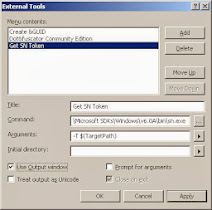
In Visual Studio, go to the Tools menu and click the External Tools menu item. This will bring up the External Tools dialog.  The image below shows the information that I have added to add a new menu item called 'Get SN Token'.

In Visual Studion 2010 you can find this exe from this location C:\Program Files\Microsoft SDKs\Windows\v6.0A\Bin\sn.exe or another place just check your device location

External Tools Dialog
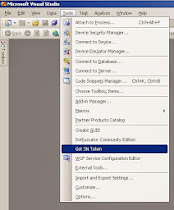
The command is the path to sn.exe which can be in different places depending on your VS version.  The easiest way to find it is to open a VS Command Prompt and type "where sn.exe".  The arguments field is set to -T and then the $(TargetPath) variable.  The "Use Output Window" option is checked so that the results will be shown in the VS output window.  After clicking OK, this will be enabled as a menu item as shown below.
VS Tools Menu
The output for this command will be displayed in the output window. This also works if you have multiple projects in the same solution.  Just highlight the project in Solution Explorer and then click the menu item.
Output Window